
Playbooks · Automation audits · 8 min
AI Workflow ROI Checklist Before You Automate
Prove an AI workflow is worth automating before you build it: measure the baseline, price the full running cost and human review, score the risk, then decide.
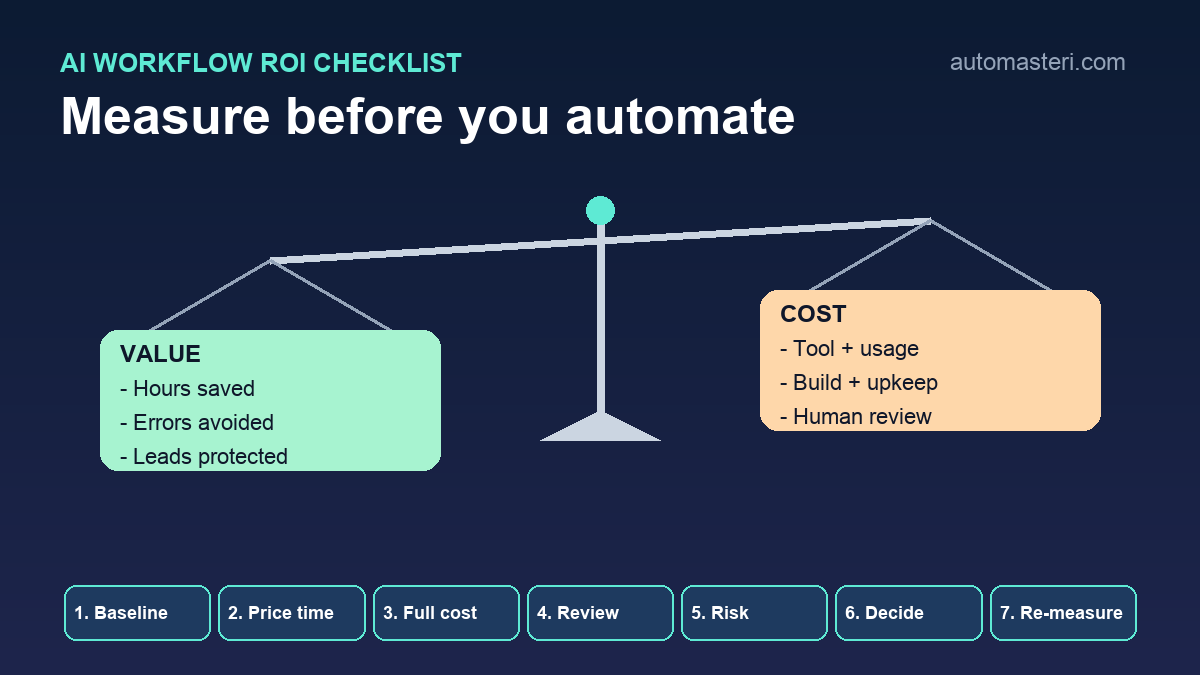
Most AI automation is chosen before anyone measures it
A new AI tool appears, it looks capable, and the business starts looking for somewhere to use it. That is the wrong way round. The question that protects your time and budget is not which tool to buy. It is which workflow is repeated, measurable, safe to change and valuable enough to automate now.
Large companies are finding the same thing. McKinsey's State of AI survey published in August 2026 reports that only 37 percent of respondents attribute any EBIT impact to their AI use, about the same as a year earlier, and only about 6 percent qualify as high performers. About 20 percent say AI operating costs, including token costs, have constrained their use. The survey also notes that the high performers fundamentally redesign workflows rather than adding AI on top of old ones.
For a small business the lesson is simple: measure first, automate second. This checklist helps a founder or operations lead decide, in an afternoon, whether one workflow deserves automation now, a pilot, or nothing yet.
The short answer: what AI workflow ROI actually means
ROI for a workflow is the value the automation creates over a period minus everything it costs to build, run and supervise over the same period. In plain terms:
- Value: staff and owner hours saved, errors and rework avoided, leads or renewals that no longer slip, and faster response where speed changes the outcome;
- Costs: subscription and usage charges, build or setup time, the human review time the workflow still needs, and the maintenance someone will do when an app or field changes;
- Risk: what a wrong or missed action would cost, and how easily you could undo it.
If you cannot put a rough number on the value side, you are not ready to automate. That is a useful finding, not a failure.
1. Describe the workflow in one sentence
Write down what starts the work, what happens, and what counts as done. For example: when a website enquiry arrives, reply within ten minutes, ask the two qualifying questions and book a call. Or: when a renewal is due in 30 days, check the account, send the reminder and update the tracker.
If it needs a paragraph to explain, it is probably several workflows. Split it and assess the piece that repeats most often. Start with the business motion, not a solution such as add a chatbot.
2. Count how often it runs and how long it takes
Frequency is where automation value comes from. A task that happens twice a month rarely repays the setup and supervision. A task that happens every day often does. Record, for one or two normal weeks:
- How many times the workflow runs per week;
- Who does it today and how many minutes each run takes, including switching between apps;
- How often it is delayed, forgotten or done twice;
- What happens when it is late: a lost lead, an unhappy customer, a missed payment, nothing at all.
Use real logs where you have them, such as inbox timestamps, CRM activity or form submissions, rather than memory. A task that takes 12 minutes and runs 60 times a month is 12 hours of effort before you count any mistakes.
3. Put an honest price on the time
Hours only become ROI once they have a value. Use the full cost of the person doing the work, not just their salary, and price owner time separately and higher, because an hour of the founder's attention usually has a better use than copying data between systems.
Be careful with time that will not really be freed. Note which saved hours you will actually redirect to sales, delivery or customers; only those count as cash value.
4. Add the cost of mistakes and delays
Errors are often worth more than the time. Estimate, from the baseline weeks, how many runs needed rework, how many enquiries waited too long, and how many renewals or invoices slipped. Then estimate what one of each costs you: the margin on a lost job, the hours to fix a wrong record, the refund or discount after a complaint.
Keep these as ranges, not precise figures. A range such as two to four lost enquiries a month at a typical job margin is enough to tell you whether the workflow matters. If the honest answer is that mistakes are rare and cheap, the ROI case rests on time alone, which is a weaker case.
5. Count the full running cost, not just the subscription
Usage-based pricing makes automation cost depend on how the workflow is built. Zapier, for example, counts a task for every successful action step. Steps in an error handler path also count, and replaying an entire Zap run counts the previously successful steps again. Its AI steps are priced by the model tier you choose. A workflow with eight action steps running 60 times a month uses roughly 480 tasks before any retries or replays.
Add the build time, whether that is your own hours or a freelancer's invoice, and a monthly allowance for maintenance: apps rename fields, connected accounts expire and prompts need tuning. AI model calls add their own usage charges. Our AI automation cost control checklist covers how to cap and watch these costs once a workflow is live: https://automasteri.com/blog/ai-automation-cost-control-checklist-small-business/ .
6. Price the human review you will still need
Automation rarely removes people from a workflow on day one, and it should not. The safest first versions are reviewed ones: the AI drafts the reply and a person sends it, or the AI classifies the ticket and a person confirms. That review time belongs on the cost side of the sheet.
Decide for each step whether the AI may act alone, needs approval, or must never act. Steps that touch payments, prices, legal commitments or sensitive customer data normally need approval. Our human approval matrix shows how to set those levels: https://automasteri.com/blog/human-approval-matrix-ai-automation/ .
7. Score the risk before you score the savings
NIST's AI Risk Management Framework organises AI risk work into four functions: govern, map, measure and manage. NIST notes that the framework is being revised, but the structure translates well to a small business. Govern means one named owner who can switch the workflow off. Map means knowing which customers, data and systems it touches. Measure means tracking errors, not just runs. Manage means having a rollback plan before launch.
- Does a wrong output reach a customer, or stay internal?
- Does the workflow move money, change prices or make commitments?
- Does it read or send personal or confidential data?
- Can you undo what it did, and how long would that take?
- Would anyone notice if it silently stopped running?
A high-risk workflow can still be worth automating, but its first version should be smaller, reviewed and closely watched, and its ROI should include the cost of that supervision.
8. Run the numbers on one worked example
Here is an illustrative example, not a benchmark. A service business receives about 120 website enquiries a month. Each first reply and qualification takes about eight minutes, so the baseline is 16 hours a month, and the owner estimates that two or three enquiries a month go cold because the reply comes the next day.
The proposed first version drafts a reply and a short lead summary, and a team member approves and sends it. Review takes about two minutes per enquiry, so four hours a month stay on the cost side. The net time saving is about 12 hours. Add the subscription and usage charges, two days of setup and an hour a month of maintenance. If recovering even one cold enquiry a month covers most of those running costs, the case is strong. If the business only receives 15 enquiries a month, the same build is hard to justify, and a saved reply template may be the better answer.
9. Decide: automate now, pilot, later or never
Use the sheet to make a clear decision. Automate now when volume is high, the value is clear and the risk is low or reviewed. Pilot when the value is likely but uncertain: automate one step, such as the draft or the alert, for a month. Wait when the process still changes every few weeks. Choose not yet when the workflow is rare, mistakes are cheap, or a template would deliver most of the value for free.
Write down the payback period you would accept, for example three or six months, before you see the quote. It is much harder to be objective after a demo.
10. Measure again after launch
Compare the same metrics as your baseline after four to six weeks: time per run, response time, errors, rework and the business outcome you chose. Some platforms help. n8n's Insights feature lets you set a fixed or dynamic time saved per workflow and then reports time saved from production executions, alongside failure rates. The summary banner is available on all plans, while the full dashboard needs Cloud Pro or Enterprise, or a self-hosted Business or Enterprise edition. n8n also notes that time saved is not yet counted for sub-workflows.
Treat those figures as estimates you configured, not proof. Check the outcome directly too, and watch for failures and silent gaps with our exception monitoring checklist: https://automasteri.com/blog/automation-exception-monitoring-checklist-small-business/ . If the workflow saves time but creates errors, or nobody uses it, the ROI is not there yet.
Your AI workflow ROI proof sheet
Fill in one sheet per workflow before anyone builds anything. If a field is hard to complete, that shows you where the business lacks visibility.
- Workflow name and business owner;
- Trigger, current steps and definition of done;
- Runs per week and minutes per run (baseline weeks recorded);
- Cost of a delay, a mistake and a missed run;
- Business outcome: revenue, cost, speed, quality or customer experience;
- First automation target and the steps that stay human-approved;
- Running cost: subscription, usage, AI calls, build and maintenance;
- Risk score and rollback plan;
- Proof metric, accepted payback period and review date.
Where to start this week
Pick the three workflows your team complains about most. Log one week of real runs for each, then fill in the proof sheet. Most businesses find that one workflow is clearly worth automating, one needs a simpler fix, and one is not worth touching yet. If you want a second view before you spend, our AI automation audit checklist shows how to review your current tools and workflows: https://automasteri.com/blog/ai-automation-audit-checklist-small-businesses/ .
The AutoMasteri free automation audit is another sensible first step: https://automasteri.com/free-automation-audit/ . AutoMasteri is a mentorship programme that helps owners design and run better systems; hands-on technical delivery is only included where the programme terms or a separate proposal say so.
FAQ
What is AI workflow ROI?
It is the value an AI-assisted workflow creates over a period, such as hours saved, errors avoided and revenue protected, minus what it costs to build, run, review and maintain over the same period.
How long should I measure before automating?
For most small teams, one or two normal weeks of real runs is enough to set a baseline. Use logs such as inbox timestamps or CRM activity rather than estimates from memory.
Which workflow should I automate first?
Start with one that runs often, takes measurable time, has a clear owner and a clear outcome, and can be improved with human review still in place for risky steps.
Should human review count as a cost?
Yes. Review time is real effort. Put it on the cost side, and reduce it only after the workflow has a clean record.
What if the ROI is unclear?
Run a small pilot: automate one step, such as a draft, a summary or an alert, for a month and measure it against the baseline before building more.
Can AutoMasteri help us assess our workflows?
AutoMasteri mentorship can help your team map workflows, score automation opportunities and plan safe first versions. Hands-on technical delivery is scoped separately.
Build the map before the tools.
Start with the free AutoMasteri automation audit, or apply for a mentor review if you want Reji to review the operating system behind your customer journey.